







Key Tips Discussed in This Blog
- Daily routine should guide the choice, as in-home systems are designed for support around the house while mobile systems extend coverage outside the home.
- Coverage needs matter, especially for seniors who spend time walking, shopping, travelling locally, or attending appointments independently.
- Fall detection can add reassurance, but it is most helpful when paired with a system that makes it easy to connect with support.
- The right system should support independence, helping seniors feel confident at home, on the go, or both.
For seniors and caregivers comparing mobile and in-home medical alert systems, the right choice often depends on where support is needed most. Some people spend most of their time at home and want a simple way to call for help from the kitchen, bedroom, bathroom, or yard. Others are more active in the community and want protection while out on walks, shopping, visiting family, or attending appointments.
This decision also connects to aging in place. The Government of Canada describes aging in place as having the health and social supports needed to live safely and independently in your home or community for as long as possible. Medical alert systems can be one part of that safety plan, especially for older adults and caregivers concerned about falls, emergencies, or being unable to reach a phone.
What Is an In-Home Medical Alert System?
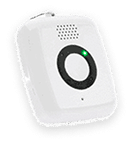
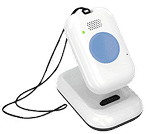
An in-home medical alert system is designed to help seniors request assistance from inside or near the home. These systems typically include a base unit and a wearable help button, such as a pendant or wristband. When the button is pressed, the user is connected to response support.
A system such as Lifeline’s HomeSafe may be a good fit for seniors who spend most of their time at home and want a simple way to reach help without relying on a phone. This can be especially useful in higher-risk areas such as bathrooms, stairs, bedrooms, and kitchens.
In-home systems can also support caregivers. Knowing that a loved one has a way to call for help can provide peace of mind and allow seniors to continue their daily routines with more confidence.
What Is a Mobile Medical Alert System?
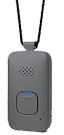
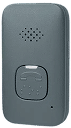
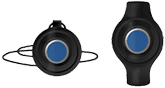
A mobile medical alert system is designed to provide support beyond the home. These systems often include a portable device or pendant with two-way communication and location technology. Some also include fall detection.
Lifeline’s On the Go with Fall Detection is designed for seniors who want support at home and away from home. It can be helpful for people who walk outdoors, take transit, drive, shop, volunteer, visit friends, or attend healthcare appointments.
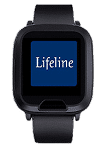
For seniors who prefer a watch-style device, the Lifeline On the Go Smartwatch may offer a familiar option. It combines smartwatch-style features, such as step tracking and heart rate measurement, with access to Lifeline assistance through a help button.
Key Differences Between Mobile and In-Home Systems
The main difference is coverage. In-home systems are designed around the home environment. Mobile systems are designed to travel with the user.
| Feature | In-Home Medical Alert System | Mobile Medical Alert System |
| Best suited for | Seniors who spend most of their time at home | Seniors who are active outside the home |
| Typical device style | Base unit with pendant or wristband | Portable pendant, mobile device, or smartwatch-style device |
| Coverage area | Home and nearby areas, depending on system range | At home and away from home, depending on connectivity |
| Location support | Usually not needed inside the home | Often includes GPS/location technologies |
| Two-way communication | Available through the system | Available through the mobile device |
| Fall detection | Available on select systems | Available on select mobile systems |
| Smartphone required | Usually no | Usually no with dedicated medical alert devices |
| Good fit for caregivers | Helpful for at-home reassurance | Helpful for active seniors and caregivers managing distance |
Neither option is automatically better for everyone. The better choice is the one that matches the senior’s actual lifestyle.
Coverage and Protection Comparison
Coverage is often the deciding factor. If a senior mostly stays home, an in-home system may provide the right level of support. It can help during everyday tasks such as bathing, cooking, getting out of bed, or moving between rooms.
For someone who leaves home often, mobile coverage may be more appropriate. A mobile system can help provide access to assistance when a senior is not near a home base unit or landline.
This matters because falls and injuries do not only happen in one place. The Government of Canada’s Safe Living Guide notes that falls are a major cause of injury among Canadian seniors and that about half of injuries occur at home. For many families, that means the right solution may depend on both home safety and community mobility.
Fall Detection Features and Safety Benefits
Fall detection can be available with both in-home and mobile medical alert systems. It is designed to recognize movement that may indicate a fall and trigger an alert when the user may not be able to press the button.
For seniors with a history of falls, balance concerns, mobility changes, or fear of falling, fall detection may add reassurance. Lifeline’s HomeSafe with Fall Detection is designed for at-home use, while On the Go with Fall Detection supports seniors who want mobile coverage.
No fall detection technology can detect every fall, so the help button remains important. Seniors should press the button whenever they can if they need assistance. Fall detection should be viewed as added support, not a replacement for prevention.
The Public Health Agency of Canada reports that falls are the main reason for injury-related hospital visits and deaths in older adults. It also notes that 34% of fall-related hospitalizations involved a hip fracture. These risks make it important to choose a system that fits both the person and the environment.
Comparing Costs and Subscription Plans
Costs can vary depending on the type of system, features, and service plan. In-home systems may cost less than mobile systems because they are designed for a more limited coverage area. Mobile systems may cost more because they often include location technology, cellular connectivity, and portable equipment.
Fall detection may also be an added feature, depending on the plan. Families should look beyond the monthly price and ask what is included: equipment, installation or setup support, fall detection, mobile coverage, response support, and replacement policies.
The most affordable plan is not always the best fit. A system that is not worn consistently or does not provide coverage where the senior spends time may not offer the reassurance the family expects.
Which System Is Best for Active Seniors?
A mobile system is often the better fit for active seniors. This may include people who walk in the neighbourhood, attend social events, shop independently, travel locally, or spend time with family and friends outside the home.
For active seniors, mobile coverage can support independence by making help easier to access away from home. Location technology can also help response support identify where assistance may be needed.
A mobile medical alert system may be especially helpful for caregivers who do not live nearby. It can provide added confidence without asking the senior to give up activities they enjoy.
Which System Is Best for Staying at Home?
An in-home system may be best for seniors who spend most of their time at home or who mainly want support inside the house. It can be a practical choice for people who live alone, have mobility challenges, or want an easy way to request help without carrying a phone.
Home-based protection can also be important for aging in place. The Government of Canada encourages older adults to consider practical home safety steps, including reducing tripping hazards, improving lighting, and using safety aids where needed. A home medical alert system can complement these efforts by making help easier to reach if something does happen.
Questions to Ask Before Choosing a Medical Alert System
Use these questions as a simple decision-making framework:
- Where does the senior spend most of their time? Mostly at home may point toward an in-home system. Frequent outings may point toward mobile support.
- Is fall detection important? A history of falls, balance concerns, or fear of falling may make fall detection worth considering.
- Will the device be worn consistently? Comfort, appearance, and ease of use all affect whether the system becomes part of daily life.
- Is location support needed? Seniors who leave home independently may benefit from mobile GPS/location technology.
- What gives caregivers peace of mind? The right system should support the senior’s independence while helping caregivers feel confident that help can be reached.
Confidence at Home and Beyond
Choosing between a mobile and an in-home medical alert system is really about choosing support that fits daily life. For some seniors, that means reliable protection around the house. For others, it means mobile coverage that supports errands, walks, visits, and appointments.
Both options can support independence, but they are designed for different routines. A home medical alert system is often the best option for seniors who want reliable support at home. A mobile medical alert system may be better for those who regularly leave home and want access to help wherever they go.
The right system should feel comfortable, practical, and easy to use. Most importantly, it should help seniors maintain independence while giving caregivers greater peace of mind.
Frequently Asked Questions
What is the difference between mobile and in-home medical alert systems?
An in-home system is designed for use inside or near the home. A mobile system is designed to provide access to help at home and away from home, often using cellular and location technology.
Who should choose a home medical alert system?
A home medical alert system may be best for seniors who spend most of their time at home and want a simple way to call for help without relying on a phone.
Who should choose a mobile medical alert system?
A mobile medical alert system may be best for seniors who regularly leave home and want access to help while walking, shopping, travelling locally, or attending appointments.
Do mobile medical alert systems include fall detection?
Some mobile medical alert systems include fall detection, while others offer it as an optional feature. Families should confirm what is included before choosing a plan.
Do in-home medical alert systems work during a power outage?
This depends on the system. Some in-home systems include backup battery support. Seniors and caregivers should ask about battery backup, range, and connectivity before choosing a provider.
Can one system support both home and away-from-home needs?
Yes. Some mobile systems are designed to support seniors both at home and away from home. This may be a good fit for someone who wants flexible coverage in different settings.
About the Author

What You Should Do Now:
Here are 5 ways we can help you or your loved one live safer and more independently at home as long as possible:
- Get our latest tips, tools and resources straight to your inbox. Sign up for our monthly newsletter.
- Not sure if the time is right for a medical alert service? Take this quick assessment to find out.
- If you would like to learn how to live a healthier and safer lifestyle, go to our blog or visit our resources section, where you can read and download guides.
- Wondering which medical alert system company is the best for your needs? We’ve put together a guide comparing the best medical alert systems for you.